
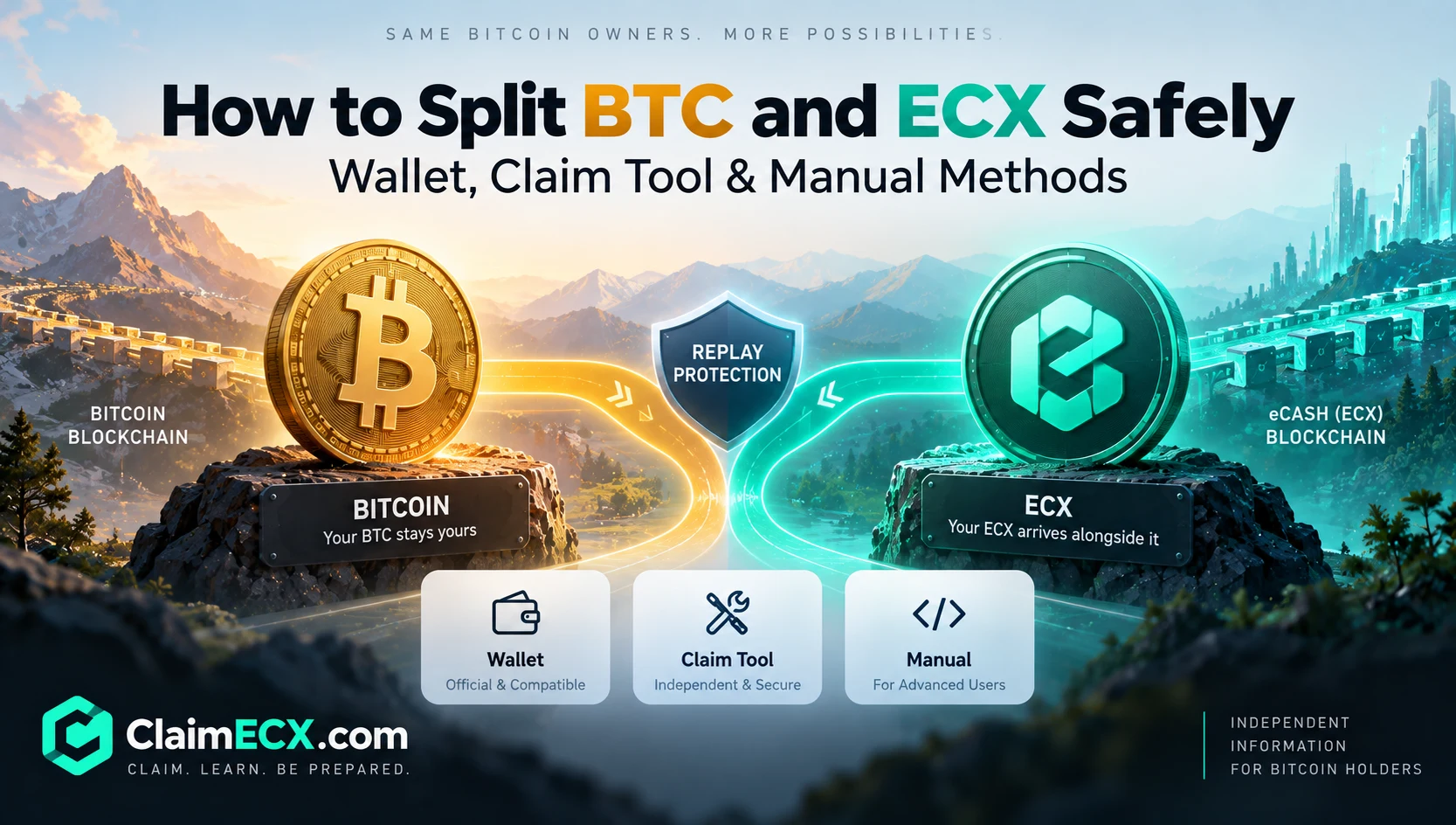
Bitcoin and eCash (ECX) become separate assets after the ECX fork, but that does not automatically mean every pre-fork coin is immediately safe to move independently.
BTC remains on the Bitcoin network. ECX exists on the separate eCash network. Because both chains share the same historical UTXOs and use Bitcoin-compatible keys and address formats, a transaction created carelessly after the fork may under some conditions be valid on both networks.
Coin splitting is the process of making the BTC side and ECX side independently spendable before you treat them as fully separated assets.
For most users, the safest approach is not to construct a special transaction by hand. Current ECX software and compatible wallets can perform the ECX-side split for you.
This guide explains the current options:
- Official eCash.com wallet and splitting tools
- Third-party wallet workflows such as ECXIUM and Qorpex
- ClaimECX tools for users who choose a claim-tool workflow
- Manual replay-protected splitting for advanced users
The technical objective is the same in every case:
Move or distinguish the ECX side in a way that Bitcoin will not accept, then verify that BTC and ECX can be managed independently.
Start Here: Check Your ECX Allocation Before Using Private Credentials
Before importing a recovery phrase, WIF private key or hardware-wallet data into any ECX-access workflow, first establish whether the Bitcoin address you care about actually has an ECX allocation.
The ECX Claim Checker uses a public Bitcoin address for the eligibility check.
A public address is not a private key. It cannot authorize spending by itself.
The checker is useful for answering basic questions first:
- Was this BTC address relevant to the ECX snapshot?
- What ECX allocation is associated with it?
- Is there any reason to proceed to a wallet-access or splitting workflow?
Do not enter a recovery phrase or private key into an eligibility checker.
The safest sequence is:
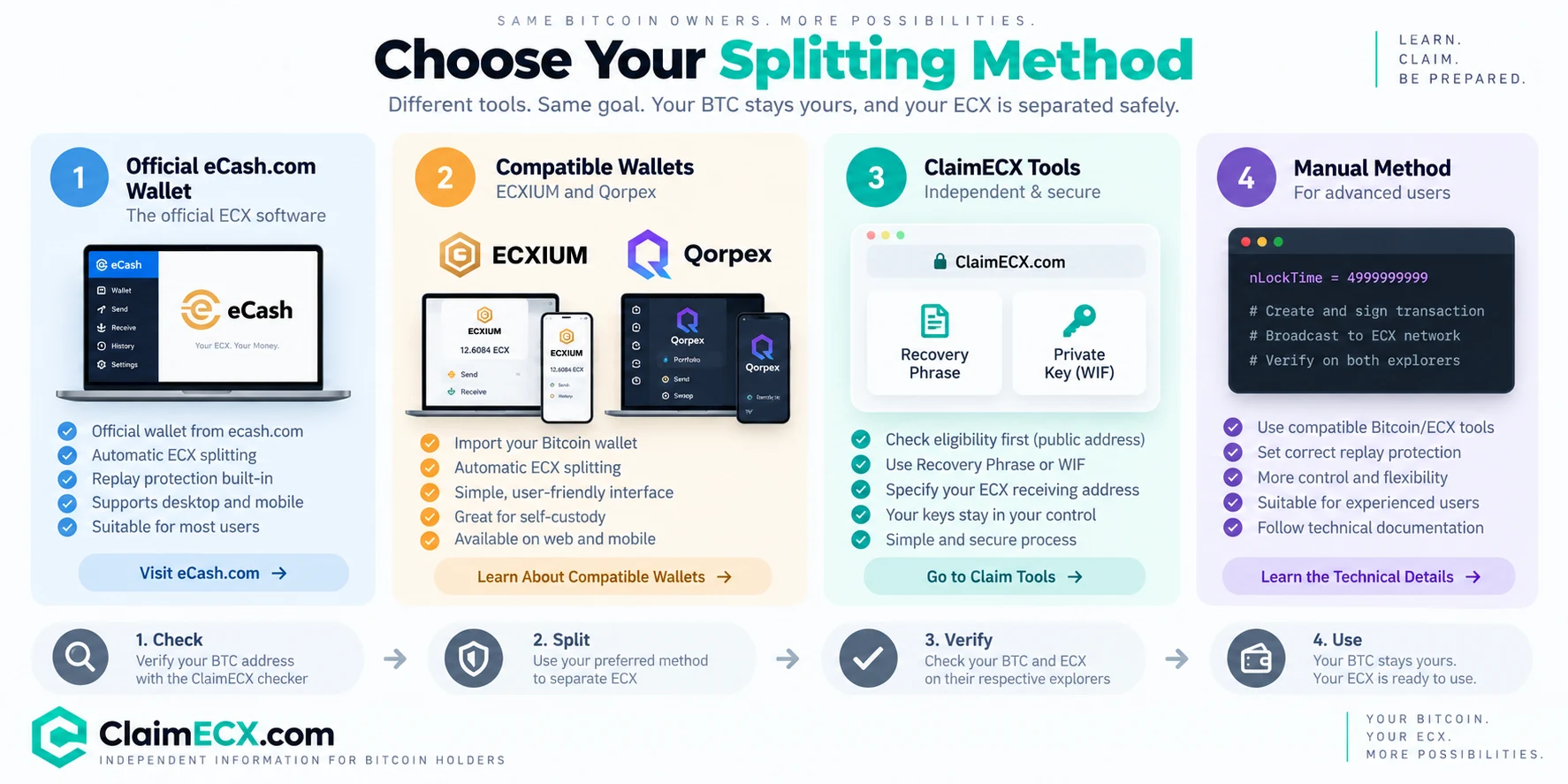
Check → understand replay risk → choose a splitting method → verify both chains.
Why BTC and ECX Need Coin Splitting
A Bitcoin fork copies the existing blockchain state into a new network.
If a UTXO existed before the ECX fork, the same historical output can exist on:
- Bitcoin, as BTC; and
- eCash, as ECX.
The same private key can initially control the corresponding output on both ledgers.
ECX deliberately keeps Bitcoin-compatible address and key formats. Official technical documentation states that ECX uses the same familiar formats, including:
1...P2PKH addresses;3...P2SH addresses;bc1q...andbc1p...SegWit/Taproot addresses;- the same WIF private-key encoding;
- the same BIP32 xpub/xprv formats.
That compatibility is useful, but it also creates an important safety property:
You cannot identify the target network just by looking at the address string.
The same address can represent coins on two different ledgers.
This is why the network, wallet and transaction context must be explicit.
What Is a Replay?
A replay occurs when a transaction intended for one forked blockchain is also accepted on the other blockchain.
Imagine a pre-fork output that exists on both Bitcoin and ECX.
If you create an ordinary transaction spending that output and the transaction is valid under both sets of rules, the transaction can potentially be reproduced on the other network.
The result may not match what the user intended.
For example, a user might intend to move BTC while also causing the corresponding ECX to follow the same spend path.
Coin splitting solves this by creating a state where the two sides no longer share the same spend history.
After a successful split:
- BTC can remain on Bitcoin;
- ECX can move on eCash;
- the two assets can subsequently be managed independently.
ECX Replay Protection Is Opt-In
ECX does not rely on every ordinary transaction automatically being invalid on Bitcoin.
Instead, current official technical documentation describes an opt-in replay-protection marker.
The key value is:
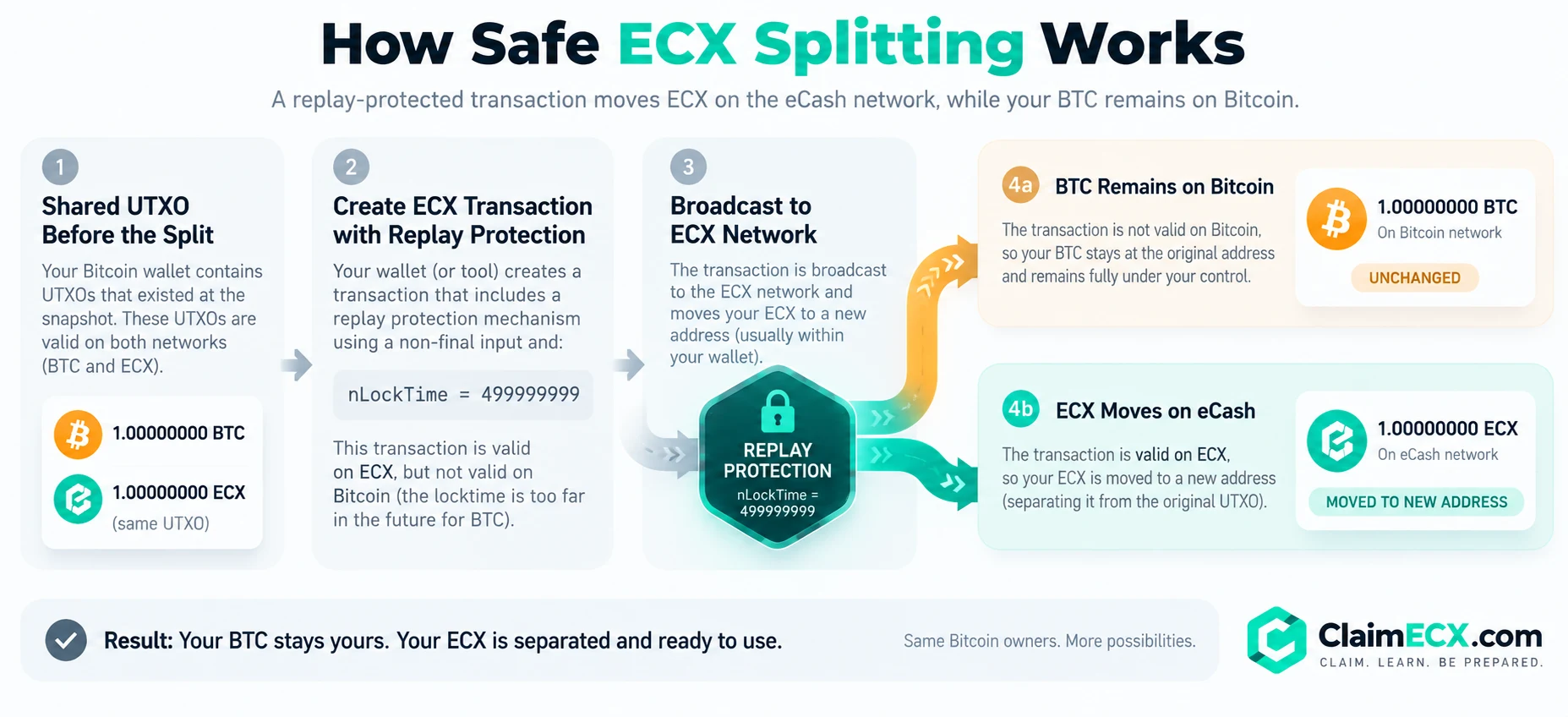
nLockTime = 499999999
On ECX, a transaction using the required construction can be accepted as final.
Stock Bitcoin interprets that locktime as a block height far in the future and therefore will not accept the transaction as a currently final Bitcoin spend.
The result is a transaction that can move ECX while the BTC side remains untouched.
Official technical documentation recommends this marker for ECX withdrawals and coin splitting.
For deeper safety context, review the current ECX Updates and the wallet documentation for the method you plan to use.
Method 1 — Official eCash.com Wallet and Splitting Tools
For most users, the official eCash.com software is the primary reference implementation for BTC/ECX splitting.
The current eCash.com Wallet documentation describes an automatic ECX-side split.
The wallet identifies coins that may still be shared with Bitcoin and, when a split is required, sends the ECX side to a fresh address of the same wallet using a replay-protected transaction.
According to the wallet documentation:
- the split moves ECX;
- the Bitcoin side remains untouched;
- the wallet pays only the ECX-side transaction fee;
- the replay-protection transaction uses
nLockTime = 499999999with non-final inputs.
This is the cleanest conceptual model:
Shared BTC/ECX output
↓
Replay-protected ECX self-transfer
↓
BTC stays where it is on Bitcoin
ECX moves to a fresh ECX-side wallet address
↓
The two sides are now separated
How the Official Wallet Detects Splittable Coins
The wallet does more than look at block height.
Its current documentation describes a two-stage detection system.
1. Block-height check
If a coin was confirmed before the fork height, the wallet can identify it as originating from shared pre-fork history.
This check is automatic.
2. Bitcoin-side outpoint check
Block height alone cannot prove that every later output is already separated.
Why?
Because ECX replay protection is opt-in. An ordinary post-fork transaction that did not use the replay marker may still exist on both chains.
The wallet therefore provides an on-demand Bitcoin-side check of the exact UTXO outpoints.
A reported result can distinguish between cases such as:
- the outpoint still exists unspent on Bitcoin;
- it has already been spent on Bitcoin;
- it does not exist on Bitcoin and is therefore chain-specific;
- the wallet has not verified enough information yet.
Coins that cannot be proven safe are reported as unverified, rather than being assumed separated.
Privacy Note
The Bitcoin-side verification is read-only: it does not sign or broadcast a Bitcoin transaction.
However, the official wallet documentation notes that checking exact outpoints through a Bitcoin backend can reveal the relevant addresses to that backend provider.
Users with stronger privacy requirements may prefer infrastructure they control.
Official Hardware-Wallet Splitter
The official ecash-com GitHub organization also publishes an ecash-splitter GUI/CLI tool described specifically as a tool for splitting hardware-wallet-secured BTC to ECX.
That is important for users whose snapshot BTC is secured by hardware wallets and who do not want to treat a mobile-wallet import as the only possible workflow.
The same organization also publishes an ECX-compatible Electrum implementation.
When Method 1 Makes Sense
Use the official eCash.com workflow when:
- you want the reference ECX implementation;
- the wallet/tool supports your wallet type;
- you prefer wallet software to construct the replay-protected transaction automatically;
- you are comfortable following the current official ECX documentation.
Always verify the current official download location before installing wallet software.
Official project: https://ecash.com/ Official source organization: https://github.com/ecash-com
Method 2 — Third-Party Wallet Workflows: ECXIUM and Qorpex
The ECX ecosystem also includes independent wallets that integrate coin splitting into the wallet-import flow.
Two current examples are ECXIUM and Qorpex.
Claim eCash is independent of these wallets. Their inclusion here is informational, not an endorsement or guarantee.
Always verify the current wallet domain, supported network and security documentation before importing sensitive credentials.
ECXIUM: Dedicated ECX Wallet With Automatic Splitting
ECXIUM is a dedicated self-custody web wallet for ECX.
Its current documentation describes the following workflow for an eligible Bitcoin wallet:
- Open the ECXIUM wallet.
- Choose Import Wallet.
- Import a compatible Recovery Phrase or WIF private key.
- ECXIUM detects the corresponding ECX.
- The wallet automatically handles safe coin splitting and replay protection where required.
- The user manages ECX independently inside ECXIUM.
The important point is that ECXIUM does not present a separate manual Split button.
Coin separation is integrated into the import process.
For compatible Bitcoin imports, ECXIUM documents support for:
- a Recovery Phrase for a compatible mnemonic-backed wallet; or
- WIF for a specific Bitcoin private key/address.
Its documentation also states that recovery phrases and private keys are processed locally in the browser and are not uploaded to ECXIUM servers.
That is a security-relevant implementation detail, but users should still verify that they are using the intended wallet domain before entering credentials.
ECXIUM splitting guide:
https://ecxium.org/guides/split-btc-and-ecx/
Import Bitcoin wallet for ECX:
https://ecxium.org/guides/import-bitcoin-wallet-for-ecx/
When ECXIUM Makes Sense
This workflow may suit users who:
- want a dedicated ECX wallet;
- have a compatible Recovery Phrase or WIF;
- prefer splitting to happen automatically during ECX wallet import;
- do not need a multi-asset wallet interface.
Qorpex: Multi-Asset Wallet With Automatic BTC/ECX Separation
Qorpex takes a different product approach.
Rather than being an ECX-only wallet, Qorpex is a multi-asset wallet with ECX support.
Its current ECX coin-splitting documentation states that when a compatible Bitcoin wallet is imported, Qorpex can:
- identify the corresponding ECX;
- perform the required BTC/ECX separation automatically;
- avoid requiring the user to manually construct a replay-protected transaction;
- leave BTC on Bitcoin while ECX becomes independently manageable on eCash.
Qorpex also explicitly distinguishes claiming/accessing ECX from coin splitting:
- accessing ECX means gaining control of the forked asset;
- splitting means ensuring BTC and ECX can subsequently be spent independently.
That is a useful distinction because some wallet interfaces combine both actions into one user experience.
Qorpex ECX coin-splitting guide:
https://qorpex.com/ecx-coin-splitting/
When Qorpex Makes Sense
This workflow may suit users who:
- want ECX inside a multi-currency wallet;
- are importing a compatible self-custody Bitcoin wallet;
- prefer the wallet to handle splitting automatically;
- want BTC and ECX represented as separate assets inside one broader wallet environment.
Method 3 — ClaimECX Tools
ClaimECX provides a different workflow.
Its role is not to replace every wallet or present itself as the only correct splitting method.
The ClaimECX approach is:
verify first, expose sensitive wallet data only when a supported access method requires it.
Step 1 — Check With a Public Address
Use the ECX Claim Checker first.
This requires only a public BTC address.
Do not provide a recovery phrase or private key just to establish eligibility.
Step 2 — Read the Claim and Security Guidance
Before moving either asset, review:
This matters because moving BTC before the corresponding BTC/ECX state is safely separated can create replay risk.
Do not assume that sending BTC away first is automatically safer.
Step 3 — Use the Claim Tool Only If You Choose That Workflow
The ECX Claim Tools support access methods based on:
- Recovery Phrase; or
- WIF Private Key;
together with an ECX receiving address.
A Recovery Phrase may control many addresses and potentially other assets.
A WIF private key controls a specific key/address.
Both are sensitive.
Only proceed if you understand which credentials you are using, why they are required and which ECX destination address will receive the result.
Why ClaimECX Is Useful Even If You Use Another Wallet
You do not have to use ClaimECX Tools simply because you use ClaimECX information.
ClaimECX can still serve as the independent verification layer:
Public BTC address
→ check allocation
→ understand the active ECX stage
→ read the replay/splitting guidance
→ choose the official wallet, ECXIUM, Qorpex, ClaimECX Tools or a manual workflow.
That separation is intentional.
The safest tool is the one whose behavior you understand and whose current implementation is appropriate for your wallet.
Method 4 — Manual Replay-Protected Splitting
Advanced users can construct ECX-side transactions using Bitcoin-compatible tooling.
The key technical rule documented for ECX is:
nLockTime = 499999999
with the transaction constructed so the ECX network accepts it as final while Bitcoin does not.
This gives advanced operators considerable flexibility.
Because ECX retains Bitcoin-compatible key and address formats, standard Bitcoin libraries, descriptor-based wallets and signing infrastructure can be reused when pointed at the ECX network.
Official integration documentation specifically notes that exchanges and advanced operators can reuse Bitcoin wallet pipelines while keying balances by both:
(chain, address)
rather than by address alone.
That final point matters.
A bc1... address by itself does not tell an operator whether a balance is BTC or ECX.
The network context must be explicit.
Manual Method Is Not the Default Recommendation
Manual splitting is suitable for users who understand:
- raw or PSBT-based transaction construction;
- UTXOs;
- locktime and sequence semantics;
- transaction signing;
- network-specific RPC/backends;
- replay risk;
- independent verification on both chains.
If those concepts are unfamiliar, use wallet software that already implements the required split.
A copy-and-paste raw-transaction recipe is intentionally not provided here because an incorrectly constructed fork transaction can have financial consequences.
Which BTC/ECX Splitting Method Should You Use?
| Situation | Practical starting point |
|---|---|
| I only want to know whether my address has ECX | ClaimECX Claim Checker |
| I want the official reference workflow | eCash.com Wallet / official splitter |
| I want a dedicated ECX web wallet | ECXIUM |
| I want ECX inside a multi-asset wallet | Qorpex |
| I want to use a Recovery Phrase or WIF with a dedicated claim workflow | ClaimECX Tools |
| I use a supported hardware wallet | Check official eCash splitter + wallet-specific instructions |
| I understand PSBT/raw transaction construction | Manual replay-protected method |
| My BTC was held on an exchange | Do not import exchange credentials; check the custodian's ECX policy |
There is no universal method that is best for every Bitcoin holder.
Wallet architecture, address type, custody model and user experience all matter.
The Safest Order of Operations
A useful default sequence is:
1. Identify the Snapshot Address
Determine which Bitcoin address or addresses held the relevant BTC at the snapshot.
Many wallets use multiple addresses, so the wallet's displayed total balance may not correspond to one address.
2. Check ECX Eligibility
Use a public-address checker first.
No private credentials are needed for this step.
3. Confirm the Active ECX Network
Do not confuse:
- Alpha practice ECX;
- Beta practice ECX; and
- permanent Mainnet ECX.
A successful split on one ECX stage does not mean you are looking at permanent Mainnet assets.
Read ECX Alpha vs Beta vs Mainnet.
4. Back Up Wallet Credentials
Before making wallet changes, verify that your existing wallet backups are correct and recoverable.
Do not create a new dependency on a recovery phrase you have never tested or identified properly.
5. Choose the Splitting Workflow
Use one of the supported approaches described above.
Do not mix instructions from several wallet workflows unless you understand exactly what each transaction does.
6. Split the ECX Side Safely
The supported workflow should create an ECX-side separation that Bitcoin cannot replay.
With the official ECX mechanism, that means a replay-protected transaction using the special locktime construction.
7. Wait for Confirmation
Do not treat an unconfirmed split as final.
Use the relevant ECX explorer or wallet status to verify that the split transaction has confirmed.
8. Verify Both Chains Independently
Check:
Bitcoin: Is the expected BTC still present or otherwise exactly where you expect it to be?
ECX: Has the ECX-side transaction confirmed at the intended destination?
Do not rely solely on one wallet interface when independent explorer verification is available.
9. Only Then Resume Normal Transfers
Once the assets are demonstrably separated, BTC and ECX can be treated as independent assets for future transactions.
Should You Move BTC to a Fresh Wallet Before Splitting?
Not by default.
This is an important correction to a common fork-claiming rule of thumb.
With some historical forks, users were often advised to move BTC first and only then expose old keys to fork software.
For ECX, an ordinary BTC transaction performed before safe separation may itself create replay risk because ECX replay protection is opt-in.
Therefore:
Do not move affected BTC first unless the procedure you are following explicitly accounts for ECX replay behavior.
A safer general approach is:
- verify the ECX allocation;
- perform a replay-protected ECX-side split;
- confirm the split;
- verify both chains;
- only then move BTC to a new wallet if desired.
If you later plan to expose old wallet credentials to third-party software, moving BTC to a fresh Bitcoin wallet after confirmed separation can reduce the value remaining under those old Bitcoin keys.
But that is a post-split security step, not a substitute for splitting.
Hardware Wallets Need Special Care
Ledger, Trezor and other hardware-wallet users should not assume they need to type a hardware-wallet recovery phrase into a web wallet.
Hardware wallets exist specifically to keep private keys away from ordinary software environments.
The official eCash organization currently provides a dedicated hardware-wallet ecash-splitter project, and ClaimECX maintains wallet-specific information for common Bitcoin wallets.
Start with the relevant wallet guide:
Do not export or type a hardware-wallet seed unless a procedure genuinely requires it and you understand the security consequences.
Recovery Phrase vs WIF Private Key
The two are not equivalent in scope.
Recovery Phrase
A recovery phrase can derive many addresses.
Depending on the wallet and derivation paths, it may control:
- multiple BTC addresses;
- change addresses;
- accounts;
- potentially other assets in multi-chain wallets.
Compromise of a recovery phrase can therefore compromise far more than one ECX allocation.
WIF Private Key
A WIF private key corresponds to a specific private key/address.
Its exposure is narrower than exposing an entire mnemonic, but it is still sufficient to spend funds controlled by that key.
Do not enter either credential into a public-address checker.
For more detail:
What About Bitcoin Held on an Exchange?
If the relevant BTC was held on an exchange or another custodian at the snapshot, the user may not control the private keys.
In that case, none of the self-custody import methods described above should be applied using exchange usernames, passwords or account credentials.
The custodian controlled the snapshot keys.
Whether customers receive ECX depends on the custodian's support and distribution policy.
Check the custodian's ECX policy and the current ECX Updates before acting.
Never enter exchange login credentials into an ECX wallet or claim tool.
How to Verify That BTC and ECX Are Actually Split
A successful wallet message is useful, but verification should focus on blockchain state.
After the split:
On ECX
Confirm that:
- the replay-protected ECX transaction exists;
- it has confirmed;
- the ECX is controlled at the expected ECX-side destination.
On Bitcoin
Confirm that:
- the corresponding BTC was not moved by the ECX split;
- no unexpected Bitcoin transaction was broadcast;
- the Bitcoin balance/outpoint state matches your expectation.
Remember that identical-looking addresses can exist on both chains.
Always verify the explorer/network before interpreting a balance.
Common BTC/ECX Coin-Splitting Mistakes
Moving BTC Before Understanding Replay Protection
An ordinary BTC transfer is not automatically a safe split.
Understand the ECX-side replay-protection process first.
Treating a Public Address and Private Key as Similar Data
They are not.
A public address can be shared for eligibility checking.
A private key or recovery phrase controls assets.
Assuming a Separate Balance Means the Coins Are Split
Two wallet balances can be displayed separately while underlying shared UTXOs still require proper separation.
Mixing Alpha, Beta and Mainnet
Alpha and Beta are practice stages.
Permanent ECX begins with Mainnet.
Confusing ECX With XEC
eCash ECX discussed in this guide is the Bitcoin-derived ECX network.
It is not the older cryptocurrency using ticker XEC.
Using the Wrong Network Because the Address Looks Familiar
ECX deliberately uses Bitcoin-compatible address formats.
The address prefix is not enough to determine the network.
Copying Manual Commands Without Understanding Them
Coin splitting is a financial operation.
If you do not understand locktime, UTXOs and transaction signing, use a wallet that implements the split for you.
Frequently Asked Questions
What does splitting BTC and ECX mean?
It means making the Bitcoin and ECX sides of forked coins independently spendable so a transaction on one network does not unintentionally affect the other.
Does splitting convert BTC into ECX?
No.
BTC remains BTC on Bitcoin. ECX is a separate asset on the eCash network.
Does splitting spend my Bitcoin?
The intended ECX-side splitting process moves ECX while leaving BTC untouched.
Always verify both chains afterward.
Why does ECX need replay protection?
Bitcoin and ECX share pre-fork transaction history and compatible key/address formats. Without a chain-specific transaction difference, some transactions may potentially be valid on both networks.
What replay-protection value does ECX use?
Current official ECX technical documentation specifies:
nLockTime = 499999999
for the opt-in ECX replay-protection mechanism.
Is the eCash.com wallet the official method?
The eCash.com Wallet and the tools published by the ecash-com organization are the project's reference software and documentation. Other independent wallets may also implement safe ECX splitting.
Does ECXIUM split BTC and ECX automatically?
Its current documentation states that for compatible imported Bitcoin wallets, ECXIUM automatically handles safe coin splitting and replay protection where required.
Does Qorpex split BTC and ECX automatically?
Its current documentation states that Qorpex can automatically handle BTC/ECX separation for compatible imported Bitcoin wallets.
Can I use ClaimECX only to check my address?
Yes.
The Claim Checker requires only a public BTC address. You may then choose whichever supported wallet or splitting method is appropriate for you.
Can I split ECX manually?
Yes, for technically advanced users who understand ECX network configuration, UTXOs, locktime and transaction construction.
Should I move my BTC first?
Do not assume so.
Because ECX replay protection is opt-in, moving affected BTC before proper separation may expose the corresponding ECX transaction state to replay risk.
Final Checklist
Before considering the process complete:
- I identified the correct Bitcoin snapshot address or addresses.
- I checked ECX eligibility using public information first.
- I confirmed whether I am working with Alpha, Beta or Mainnet.
- I backed up the wallet credentials I control.
- I chose one supported splitting workflow.
- I did not move affected BTC first without understanding replay risk.
- The ECX-side split used an appropriate replay-protected method.
- The ECX transaction confirmed.
- I verified the ECX result on the correct network.
- I independently verified that my BTC remained where expected.
- I will only use private credentials in a workflow that genuinely requires them.
The Bottom Line
BTC and ECX are separate assets, but safe independence after a fork requires more than simply seeing two balances.
The critical step is creating an ECX-side transaction state that Bitcoin cannot replay.
For most users, that is best handled by software that already understands ECX replay protection:
- the official eCash.com Wallet or splitter;
- an independent compatible wallet such as ECXIUM or Qorpex;
- the ClaimECX Tools workflow for users who choose it;
- or, for advanced users, a manually constructed replay-protected ECX transaction.
ClaimECX's role is to help users verify first, understand the risk and choose the appropriate method.
Start with a public Bitcoin address.
Do not expose private credentials merely to check eligibility.
And do not treat BTC and ECX as safely independent until you have verified the result on both chains.
Sources & Further Reading
Official eCash / ECX Sources
- eCash.com — official project site https://ecash.com/
- eCash.com Wallet — official mobile wallet source and coin-splitting documentation https://github.com/ecash-com/ecash-wallet-mobile
- eCash integration guide / fast facts https://github.com/ecash-com/fast-facts
- Wallets, keys and addresses https://github.com/ecash-com/fast-facts/blob/main/02-wallets-keys-addresses.md
- Official eCash GitHub organization — includes
ecash-splitter, Electrum ECX and node software https://github.com/ecash-com
Independent Wallet Implementations
- ECXIUM — Split BTC and ECX https://ecxium.org/guides/split-btc-and-ecx/
- ECXIUM — Import Bitcoin Wallet for ECX https://ecxium.org/guides/import-bitcoin-wallet-for-ecx/
- Qorpex — ECX Coin Splitting & Bitcoin Replay Protection https://qorpex.com/ecx-coin-splitting/
Claim eCash Resources
- ECX Claim Checker https://getecx.org/claim/checker
- ECX Claim Tools https://getecx.org/claim/tools
- How to Access & Split ECX https://getecx.org/claim/how-to
- ECX Claim Security https://getecx.org/claim/security
- ECX Updates https://getecx.org/updates
Editorial note: Claim eCash is an independent information and claim resource. eCash.com, ECXIUM and Qorpex are separate projects/services. Wallet behavior and pre-release ECX software can change; verify current instructions and the active network before using sensitive wallet credentials.
Check Before You Split
Use only your public Bitcoin address to verify your ECX allocation before choosing a wallet or claim method.